

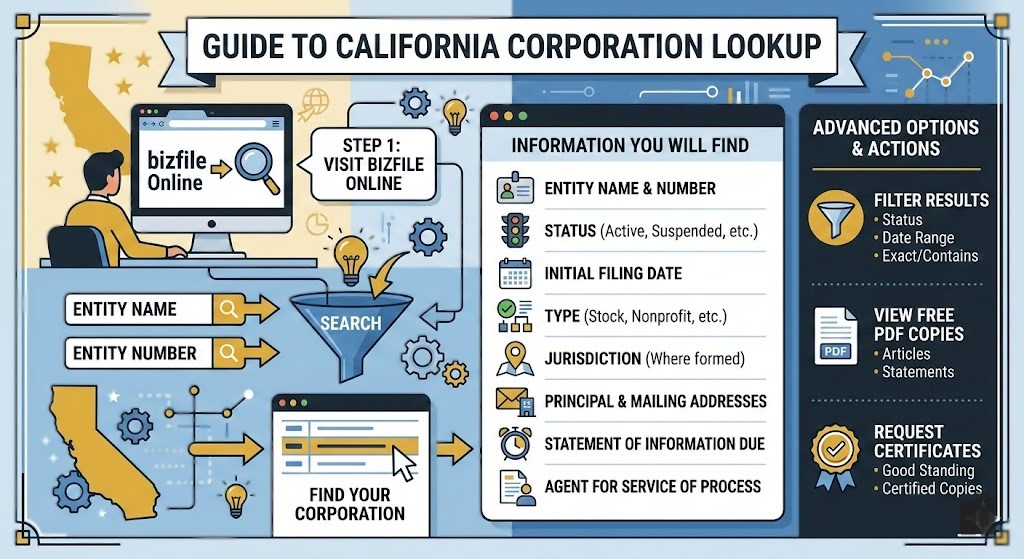
Before starting a business partnership, signing a contract, or launching a company of your own, it’s important to confirm that the business you’re dealing with actually exists. That’s where the California business search becomes extremely useful.
The State of California provides a public database that allows anyone to verify registered companies. With a few simple steps, you can check whether a business is active, view its formation details, identify its registered agent, and review official filing records.
While the search tool itself is straightforward, many people aren’t sure how to interpret the information it provides. Similar company names, confusing status labels, and multiple entity types can make the results difficult to understand.
This guide explains everything clearly. You’ll learn how the California business search works, what information you can find, and how to use the system to verify companies quickly and confidently.
Quick Answer
The California business search is a public online database maintained by the California Secretary of State. It allows users to look up registered businesses, verify entity status, review filing history, and confirm company details. Searches can be performed using a business name, entity number, or keyword.
California Business Search Overview
| Feature | Details |
|---|---|
| Database owner | California Secretary of State |
| Search methods | Business name, entity number, keyword |
| Entities included | LLCs, corporations, partnerships, nonprofits |
| Cost | Free public access |
| Information available | entity status, formation date, officers, registered agent |
| Documents | many filings available as downloadable PDFs |
What Is the California Business Search?
The California business search is an online database containing official records for companies registered within the state. It includes information for corporations, limited liability companies, partnerships, and nonprofit organizations.
This system is maintained by the Secretary of State’s Business Programs Division and serves as the official record of business registrations in California.
Anyone can use the database to confirm whether a company is legally registered and review key details about its structure and status.
Why the Business Search Database Exists
Public access to business records helps create transparency and protects both consumers and companies.
The database allows users to:
• verify whether a business legally exists
• confirm whether a company is active or suspended
• review official filing records
• identify registered agents and corporate officers
• check business legitimacy before entering agreements
Because business registration records are public information, the search tool is completely free to use.
What Information You Can Find With a California Business Search
A business entity search can reveal several important details about a company.
Basic Business Information
Most business records include core identifying data such as:
• legal business name
• entity number
• date of formation
• jurisdiction of registration
• business structure (LLC, corporation, partnership)
This information confirms whether a company name is officially registered.
Entity Status
One of the most important fields in the search results is the entity status.
Active
The business is registered and allowed to operate in California.
Suspended
The entity failed to meet legal or tax requirements and may not legally conduct business until reinstated.
Dissolved
The company has formally closed and no longer exists as a legal entity.
Canceled
The registration has been terminated or withdrawn.
Understanding these statuses helps determine whether a company is currently operating legally.
People Associated With the Business
Search results may also list individuals connected to the company, including:
• registered agent for service of process
• corporate officers or directors
• LLC managers or members
The registered agent is especially important because this person or company receives legal documents on behalf of the business.
Filing History and Documents
The database also provides access to a company’s filing history. Depending on the entity, you may find records such as:
• Articles of Incorporation
• Articles of Organization
• Statements of Information
• amendments and name changes
• mergers or conversions
Many of these filings can be downloaded as PDF documents for verification or legal research.
How to Use the California Secretary of State Business Search
The search tool is designed for public use and does not require registration.
There are three primary ways to search.
Search by Business Name
Entering a company name is the most common method. The database will return all businesses with matching or similar names.
This method is useful for researching competitors or checking name availability.
Search by Entity Number
If you know the entity number assigned by the Secretary of State, you can search directly using that number.
This is the fastest and most precise search option because entity numbers are unique.
Search by Keyword or Partial Name
When the exact company name is unknown, using part of the name can help identify the business.
The system will return results containing the words entered in the search field.
Step-by-Step Guide to Performing a California Business Search
If you’ve never used the database before, the process is straightforward.
Step 1: Visit the Official Business Search Portal
Open the California Secretary of State business search page. This is the official database where all entity records are stored.
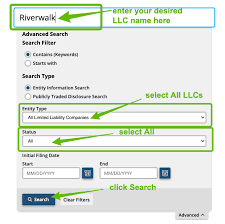
Step 2: Choose the Search Category
You can choose between:
• corporation / LLC / LP search
• trademark search
• Uniform Commercial Code (UCC) search
Most business lookups use the corporation or LLC search option.
Step 3: Enter Your Search Query
Type one of the following:
• exact business name
• partial name
• entity number
Partial searches often help when the exact spelling is uncertain.
Step 4: Review the Results List
After submitting the search, the system displays a list of matching businesses with:
• entity name
• entity number
• registration date
• current status
Step 5: Open the Detailed Business Record
Clicking the business name opens the complete profile containing:
• company information
• officer or agent details
• filing history
Step 6: Download Official Documents
If available, documents can be downloaded directly as PDF files.
These filings provide official confirmation of a company’s legal status.
How to Check If a Business Name Is Available in California
Entrepreneurs often use the database to determine whether a business name is already registered.
To check name availability:
- Search the name in the business database
- Review similar spellings or variations
- check entity status of existing names
- avoid names that are too similar to existing businesses
Choosing a unique name helps avoid registration issues when forming a new company.
Tips for Getting Accurate Search Results
A few simple strategies can make searches more effective.
Use Partial Names
The database may not always match exact phrases, so searching with a shorter version of the name can reveal more results.
Example: search “Sunrise Tech” instead of “Sunrise Technologies LLC.”
Check Previous Business Names
Companies sometimes rebrand or change names. Older filings may still appear under the original name.
Use the Entity Number
If available, searching by entity number returns the exact company record instantly.
Review Filing History Carefully
Past filings may reveal ownership changes, amendments, or status updates.
Common Mistakes to Avoid
Many users misunderstand the information provided in the search results.
Assuming Active Means Fully Compliant
A business may appear active even if it has pending filings or other compliance issues.
Ignoring the Registered Agent
The registered agent is the legal contact point for lawsuits and government notices.
Confusing Similar Business Names
Different companies can have nearly identical names. Always verify the entity number.
Real-World Examples
Verifying a Contractor
A homeowner wants to hire a contractor but first checks the business database to confirm the company exists and is active.
Checking Business Name Availability
An entrepreneur preparing to launch a startup searches the database to ensure their preferred business name is not already registered.
Legal Due Diligence
Attorneys often review business records before drafting contracts or filing legal actions to confirm the company’s legal standing.
Frequently Asked Questions
What is the California business search used for?
It allows users to verify registered companies, check entity status, and access public business records.
Is the California Secretary of State business search free?
Yes. Anyone can access the database without paying a fee.
Can I download official business documents?
Many filings, including formation documents and statements of information, are available for download.
How often is the database updated?
Records are updated regularly as new filings are processed by the Secretary of State.
Can two businesses have the same name in California?
Businesses cannot register identical names, but similar names may exist if they are legally distinguishable.
Can I search by owner name?
Direct searches by owner name are generally not available, but officer or agent names may appear in company records.
Key Takeaways
• The California business search allows anyone to verify registered companies.
• Searches can be performed using a business name or entity number.
• Results reveal entity status, formation details, and filing history.
• The database is free and maintained by the California Secretary of State.
• It is widely used for due diligence, research, and business verification.
Final Thoughts
The California business search is one of the most valuable public tools for verifying company information. Whether you are researching a potential partner, checking a contractor’s legitimacy, or planning to start your own business, the database provides reliable insights drawn directly from official state records.
Understanding how to interpret these records allows you to make smarter business decisions, avoid unnecessary risks, and verify company details before entering agreements.
Visit our website for more article about business : exposednews.co.uk
